Bubbl.us
I enjoy creating mind maps, as this is how I distinguish my ideas most effectively. I had never used an online concept mapping tool before and found the process quite simple. The bubbl.us website was very easy to navigate, which made it very enjoyable to create. I think this would be a great tool to use in a classroom to stimulate higher order thinking. It would be great to use individually for assignments, or as a class at the beginning of a new topic or unit. This ICT would be great if it could be used on an interactive whiteboard, as learners could participate in the collaboration and construction process together.
Below is my bubbl.us mind map which demonstrates the benefits and challenges of using this ICT in the classroom.
Monday, 5 December 2011

Google Documents
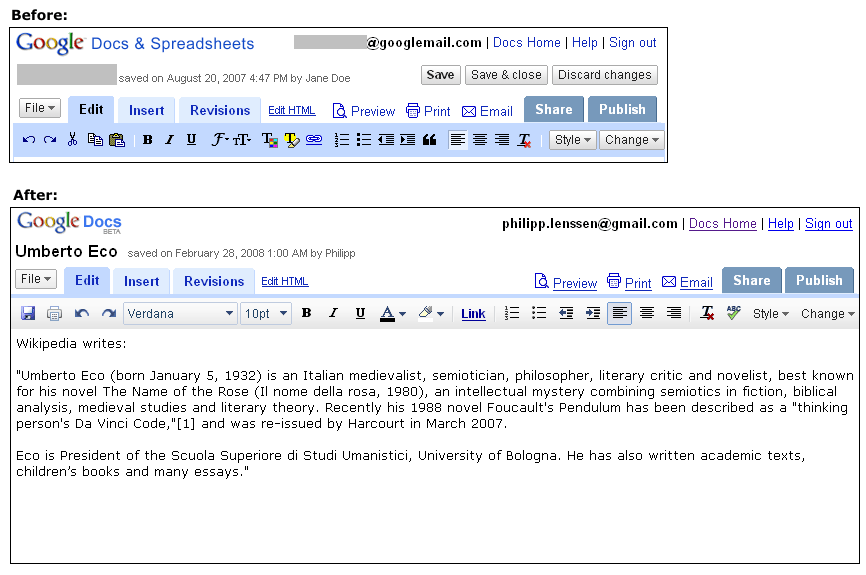
I have used Google Documents in several group assignments for university. This is a great ICT to create a safe and secure channel for collaborative learning. Learners are able to create a word document and share it with others. This is protected, so as each person is provided access to the document by the creator, ensuring safety of the document. In a classroom context, students could use this ICT to collaborate ideas in small groups or as a cohort. This could also aid the learning manager with assessment and analysis of student work, as participation contributions can be distinct.
Below is an image of a Google Document.

Below is an image of a Google Document.

Image retrieved from: http://blogoscoped.com/files/google-docs-change-2008-02-large.png
Google Maps
I have used Google Maps on many occasion through the application on my smart phone. It is so simple to open the app while on the go, or whilst planning a trip using the computer. The maps are simple and easy to navigate. When using the application while driving, it acts similarly to a GPS, in that it tracks where you are going and repositions your location automatically.
This ICT could be used to take students orienteering! Learners could view their track on the computers in the classroom before leaving, so as they had some prior knowledge of the area before departing. If the track is difficult, or young learners are participating, the Google Maps application could be used through an iPod touch. Providing learners with this tool allows them to gain new knowledge about how to read and navigate a map. If working in pairs or small groups, the use of this ICT would facilitate learning of team building and communication skills.
Below is a screen shot of a Google Map in Sunrise Beach, where I live.

This ICT could be used to take students orienteering! Learners could view their track on the computers in the classroom before leaving, so as they had some prior knowledge of the area before departing. If the track is difficult, or young learners are participating, the Google Maps application could be used through an iPod touch. Providing learners with this tool allows them to gain new knowledge about how to read and navigate a map. If working in pairs or small groups, the use of this ICT would facilitate learning of team building and communication skills.
Below is a screen shot of a Google Map in Sunrise Beach, where I live.

Google Earth
Although I had heard several opinions regarding Google Earth, I had never explored the ICT myself. After downloading the program onto my computer, I naturally searched for my home, then my parents home. I then realised I had not yet visited my sisters new home in Tasmania, and quickly searched for it. I was amazed at the level of detail I was provided with. Not only could I view the building and street, I could see cars parked out the front and trees in the garden.
Using this tool in the classroom would be a great way to create a real life context for students when studying other countries or cultures. Students are provided with the ability to navigate their way around the world, and record the places they explore. This is a great way to engage learners and stimulate higher order thinking as it is providing them with a learning experience in an environment they have never been before. I am really looking forward to using this ICT in the classroom to facilitate learning about different cultures, and allowing students to get a real life understanding of what it looks like.
Below is a screen shot I took when searching for my sisters home in Tasmania.

Using this tool in the classroom would be a great way to create a real life context for students when studying other countries or cultures. Students are provided with the ability to navigate their way around the world, and record the places they explore. This is a great way to engage learners and stimulate higher order thinking as it is providing them with a learning experience in an environment they have never been before. I am really looking forward to using this ICT in the classroom to facilitate learning about different cultures, and allowing students to get a real life understanding of what it looks like.
Below is a screen shot I took when searching for my sisters home in Tasmania.

Sunday, 4 December 2011
Animations & Simulations
Learning Object - Dissect a Frog
This learning object facilitates a learning experience about the dissection of frogs and other small animals. It is an interactive CD that can be subscribed to by teachers for $300 annually. This ICT allows the learning manager to support a scaffolded learning experience plan with an interactive tool. An engaging activity which allows students to participate, collaborate and reflect upon their new understandings.
 Image retrieved from: http://dissect.froguts.com/
Circuits
This learning object allows students to create an electrical circuits using a battery, light bulbs, resistors and a switch. This is an engaging ICT as it allows learners to interact and create their own circuit. This could also be used as an evaluation tool for learning managers to establish students prior knowledge about how electrical circuits work or to check if learning outcomes have been achieved.
Below is a screen shot of a circuit I created using this ICT.
Gapminder
This ICT is a great interactive tool that engages learners while constructing a graph. These graphs can be created to be either simple or complex. Not only are learners are able to create and engage with this graphing concept, but higher order thinking is stimulated through other published graphs. These are available for students to view, collaborate their thoughts and ideas with peers.
Below is a screen shot I took of a graph demonstrating Wealth and Health of Nations.

Image retrieved from: http://www.gapminder.org/world/
This learning object facilitates a learning experience about the dissection of frogs and other small animals. It is an interactive CD that can be subscribed to by teachers for $300 annually. This ICT allows the learning manager to support a scaffolded learning experience plan with an interactive tool. An engaging activity which allows students to participate, collaborate and reflect upon their new understandings.

Circuits
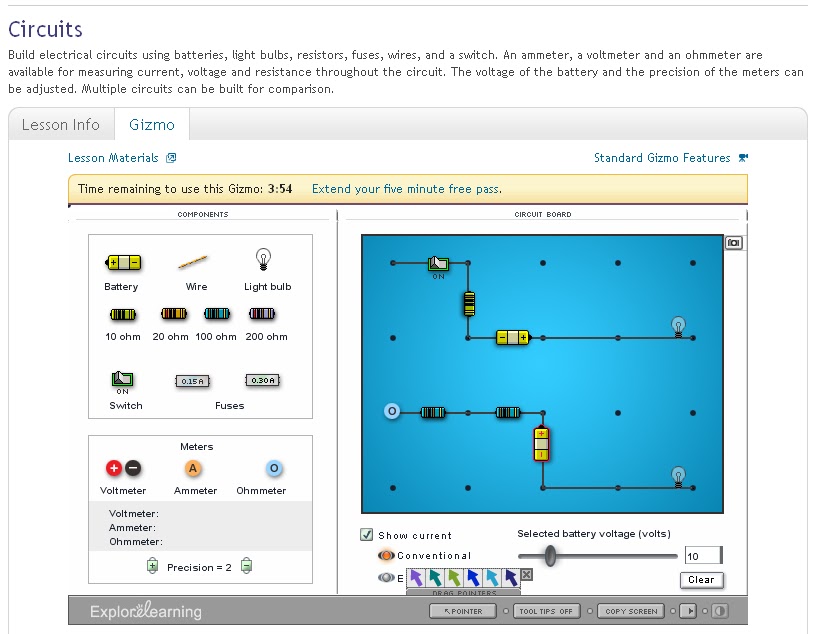
This learning object allows students to create an electrical circuits using a battery, light bulbs, resistors and a switch. This is an engaging ICT as it allows learners to interact and create their own circuit. This could also be used as an evaluation tool for learning managers to establish students prior knowledge about how electrical circuits work or to check if learning outcomes have been achieved.
Below is a screen shot of a circuit I created using this ICT.
Gapminder
This ICT is a great interactive tool that engages learners while constructing a graph. These graphs can be created to be either simple or complex. Not only are learners are able to create and engage with this graphing concept, but higher order thinking is stimulated through other published graphs. These are available for students to view, collaborate their thoughts and ideas with peers.
Below is a screen shot I took of a graph demonstrating Wealth and Health of Nations.
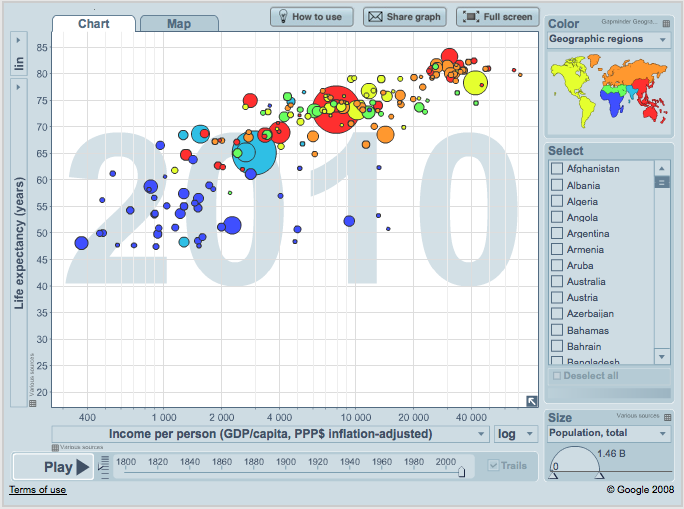
Image retrieved from: http://www.gapminder.org/world/
Friday, 2 December 2011
Glogster
I am very familiar with the concept of scrapbooking. Therefore when presented with the idea of doing so online, I was very excited to try it out. I began by creating a profile on the glogster website and explored. I was amazed at how many tools can be used.I created my glogster around the concept of e-learning and my new knowledge and understandings. I incorporated the use of images and links to my own creations. I think this was a great way to compile creations and reflect upon what I have learned so far.
There are many ways in which this ICT can be used to stimulate higher order thinking in the classroom. Some examples of this are; students could use glogster to create collages or scrapbook pages of their learning experiences individually or in small groups. This would allow students to collaborate ideas before adding images, text and audio to their online scrapbook. Glogster could also be used with a whole class as a hook to a learning experience or inquiry either in the computer lab or printed and displayed in the classroom. Using glogster as an assessment tool could also be beneficial, as it would allow students to create several pages demonstrating their thoughts and ideas on a particular topic.
A screen shot containing the glogster I created is located below along with a PMI chart explaining the benefits and challenges of using glogster as an ICT.

There are many ways in which this ICT can be used to stimulate higher order thinking in the classroom. Some examples of this are; students could use glogster to create collages or scrapbook pages of their learning experiences individually or in small groups. This would allow students to collaborate ideas before adding images, text and audio to their online scrapbook. Glogster could also be used with a whole class as a hook to a learning experience or inquiry either in the computer lab or printed and displayed in the classroom. Using glogster as an assessment tool could also be beneficial, as it would allow students to create several pages demonstrating their thoughts and ideas on a particular topic.
A screen shot containing the glogster I created is located below along with a PMI chart explaining the benefits and challenges of using glogster as an ICT.
PLUS
|
MINUS
|
INTERESTING
|
|
|
|

My glogster can be viewed at: http://www.glogster.com/jennacherie/e-learning-tools/g-6lssaodiaokuprkfe7a9ka0
Prezi
Frustration! I found creating this prezi quite frustrating. I found it difficult to manoeuvre as each time I double clicked my mouse the prezi would move around and go somewhere completely different. After several attempts, I managed to complete and save it. After playing around with the tool I found it easier to manage, but thought that for young learners it could be quite disengaging.
This ICT would be great to use as a hook for a learning experience with the whole class. This could be demonstrated through a slide show on a PowerPoint or in a computer lab. I found the prezi to be very visually engaging and a fun, interactive tool. If used within a well scaffolded learning experience, a prezi could be an effective tool to use in the classroom. However learners may become easily distracted or frustrated if they are unaware about how to use it appropriately.
The prezi I have created below demonstrates some benefits and challenges to using a prezi for e-learning.
This ICT would be great to use as a hook for a learning experience with the whole class. This could be demonstrated through a slide show on a PowerPoint or in a computer lab. I found the prezi to be very visually engaging and a fun, interactive tool. If used within a well scaffolded learning experience, a prezi could be an effective tool to use in the classroom. However learners may become easily distracted or frustrated if they are unaware about how to use it appropriately.
The prezi I have created below demonstrates some benefits and challenges to using a prezi for e-learning.
Subscribe to:
Comments (Atom)